Case Study · Enterprise AI Product

Aira

Aira

Aira

Designing an AI system that centralizes decision-making across meetings, tasks, and workflows.

Designing an AI system that centralizes decision-making across meetings, tasks, and workflows.

Role

Role

Product Designer

Product Designer

Ownership

Ownership

End-to-End Design

End-to-End Design

Scope

Scope

AI work orchestration system

AI work orchestration system

Overview
Overview
Overview

One AI Companion Across Your Entire Work Stack

One AI Companion Across Your Entire Work Stack

One AI Companion Across Your Entire Work Stack

Aira is an intelligent work orchestrator that eliminates context-switching by creating a unified AI layer across meetings, tasks, emails, and code—saving professionals 10+ hours weekly.

Aira is an intelligent work orchestrator that eliminates context-switching by creating a unified AI layer across meetings, tasks, emails, and code—saving professionals 10+ hours weekly.

60%

Cognitive Load Reduction

Cognitive Load Reduction

10+

Hours Saved Weekly

Hours Saved Weekly

92%

User Satisfaction

User Satisfaction

The Problem
The Problem

The Hidden Cost of App Fragmentation

The Hidden Cost of App Fragmentation

The Hidden Cost of App Fragmentation

I began with a critical question: Why do knowledge workers feel overwhelmed despite having dozens of productivity tools?

I began with a critical question: Why do knowledge workers feel overwhelmed despite having dozens of productivity tools?

Modern professionals juggle an average of 13 tools daily—email, Slack, Jira, calendar, and more. Each context switch costs 23 minutes of productivity.

Modern professionals juggle an average of 13 tools daily—email, Slack, Jira, calendar, and more. Each context switch costs 23 minutes of productivity.

23min

Lost per context switch

Lost per context switch

13+

Tools used daily

Tools used daily

2.5hrs

Lost productivity

Lost productivity

Through 47 user interviews with product managers, engineers, designers, and team leads, a universal pattern emerged: everyone toggled between 13+ tools daily, losing 25% of their workday to context-switching.

Through 47 user interviews with product managers, engineers, designers, and team leads, a universal pattern emerged: everyone toggled between 13+ tools daily, losing 25% of their workday to context-switching.

"I spend my first hour every morning just figuring out what to work on. By the time I'm ready to actually work, I'm already exhausted."

Senior Product Manager, Series B SaaS Company

But fragmentation was just the surface problem

But fragmentation was just the surface problem

But fragmentation was just the surface problem

Digging deeper revealed four critical pain points:

Digging deeper revealed four critical pain points:

1

The Forgotten Achievements Gap

Professionals struggled to recall and articulate their work during performance reviews. Key contributions were scattered across Jira, meetings, and emails, forcing people to reconstruct months of work manually—often incompletely.

2

Meeting Preparation Paralysis

Preparing for meetings required manually scanning Slack threads, Jira tickets, and email chains. This often took 30+ minutes per meeting, leading many to join underprepared—or skip preparation entirely.

3

Priority Blindness in Communication

With 100+ daily emails, important messages—especially from leadership or cross-functional teams—were buried among newsletters, notifications, and automated updates.

4

Morning Decision Fatigue

At the start of the day, professionals lacked a clear sense of what required immediate attention. Tasks, meetings, and messages lived in different tools, leaving people unsure where to begin.

Research & Discovery

Understanding Four Different Worlds

Understanding Four Different Worlds

Understanding Four Different Worlds

The research revealed that different roles needed the same intelligence but completely different interfaces. I mapped workflows for four distinct personas:

The research revealed that different roles needed the same intelligence but completely different interfaces. I mapped workflows for four distinct personas:

Persona 1 — Primary

Arjun Mehta

Product Manager, 31

Goals

Start each day knowing what actually matters

Communicate impact clearly during reviews

I need a single source of truth that tells me what deserves my attention today.

Arjun Mehta

Product Manager, 31

Arjun Mehta

Product Manager, 31

Persona 2 — Core Contributor

Priya Sharma

Senior Engineer, 29

Goals

Work with full task context without leaving the IDE

Capture contributions without extra reporting

My work lives in code and tickets — reviews shouldn’t depend on my memory.

Priya Sharma

Senior Engineer, 29

Priya Sharma

Senior Engineer, 29

Persona 3 — Manager View

Dev Iyer

Engineering Manager, 35

Goals

Spot blockers before they affect delivery

Spend less time preparing for status updates

I want to understand my team’s reality without scheduling another meeting.

Dev Iyer

Engineering Manager, 35

Dev Iyer

Engineering Manager, 35

Persona 4 — Cross-Functional Lead

Riya Kapoor

Design Lead, 33

Goals

Track campaign progress across tools

Generate stakeholder-ready decks faster

The work is happening — it just isn’t visible in one place.

Riya Kapoor

Design Lead, 33

Riya Kapoor

Design Lead, 33

Evening Wrap-Up

6:00 PM

Before

Hard to track what was done

Forgetting achievements

After

Auto daily logs

Continuous achievement tracking

Morning Kickoff

8:00 AM

Before

Too many unread messages

No clear top priorities

After

Daily AI Brief gives top 3

Combines emails, Slack, Jira

Midday Execution

12:00 PM

Before

Constant context switching

Manual reporting & updates

After

Unified workspace view

1-tap status updates

Afternoon Meetings

2:00 PM

Before

No time to prep meeting context

Action items get lost afterward

After

Auto meeting summaries

Auto task extraction → Jira

Evening Wrap-Up

6:00 PM

Before

Hard to track what was done

Forgetting achievements

After

Auto daily logs

Continuous achievement tracking

Morning Kickoff

8:00 AM

Before

Too many unread messages

No clear top priorities

After

Daily AI Brief gives top 3

Combines emails, Slack, Jira

Key finding: Different roles faced different pain points, but all struggled with the same gap—work context lived in fragments. The challenge was designing a single system that could adapt to each role without feeling generic.

Key finding: Different roles faced different pain points, but all struggled with the same gap—work context lived in fragments. The challenge was designing a single system that could adapt to each role without feeling generic.

Design Approach
Design Approach

From Insight to Structure

From Insight to Structure

From Insight to Structure

1

Fragmented Context

Work signals are distributed across tools and domains.

2

Opaque Automation

AI systems often act without explaining intent or confidence.

3

Cognitive Overload

Professionals manage parallel priorities with limited mental bandwidth.

Design Decisions
Design Decisions

Critical Tradeoffs & Exploration

Critical Tradeoffs & Exploration

Critical Tradeoffs & Exploration

Every major decision required exploring alternatives, weighing tradeoffs, and choosing the path that best served user needs over theoretical elegance.

Every major decision required exploring alternatives, weighing tradeoffs, and choosing the path that best served user needs over theoretical elegance.

The gap between “good idea” and “right solution” is filled with hard choices. Here are three pivotal decisions that shaped Aira’s product model.

The gap between “good idea” and “right solution” is filled with hard choices. Here are three pivotal decisions that shaped Aira’s product model.

Decision 1

How Should AI Deliver Insights?

How Should AI Deliver Insights?

How Should AI Deliver Insights?

The Challenge

The Challenge

Users needed AI to surface priorities, but every delivery model had cognitive costs. The wrong choice would add noise instead of reducing it. More critically, professionals manage multiple priorities simultaneously—they need both overview and depth, not forced sequences.

Users needed AI to surface priorities, but every delivery model had cognitive costs. The wrong choice would add noise instead of reducing it. More critically, professionals manage multiple priorities simultaneously—they need both overview and depth, not forced sequences.

Design Exploration Journey

Design Exploration Journey

Notification Feed Model

Notification Feed Model

Notification Feed Model

Attempt 1 — Rejected

“Surface work as real-time events so nothing is missed.”

Works Well When

Works Well When

Time-critical alerts need immediate attention

Monitoring event-driven systems

Single-threaded workflows with clear next actions

Breaks Down When

Breaks Down When

Multiple priorities compete simultaneously

Context is required to make informed decisions

Notifications create anxiety rather than clarity

Decision Timeline Model

Decision Timeline Model

Decision Timeline Model

Attempt 2 — Explored

“Guide users through decisions in priority sequence based on context and urgency.”

Shines When

Shines When

Work follows a clear sequence with explicit dependencies

Users need guided flow through complex processes

Temporal urgency is the primary prioritization factor

Becomes Limiting When

Becomes Limiting When

Work is parallel across multiple domains

Users need to see the full landscape and context

Priorities shift dynamically throughout the day

Forced sequencing reduces user autonomy

Structured Workspace (Dashboard)

Structured Workspace (Dashboard)

Structured Workspace (Dashboard)

Final Direction — Selected

“Provide full situational awareness while preserving flexible decision-making.”

What This Enables

What This Enables

See the entire work landscape at a glance

Act in any order based on context and judgment

Understand relationships between tasks, meetings, and emails

Switch between parallel responsibilities without losing context

Tradeoffs We Accepted

Tradeoffs We Accepted

Requires intelligent prioritization to prevent information overload

More complex system orchestration across multiple domains

Users must interpret context rather than follow guided sequence

AI must continuously adapt to evolving work patterns

Why This Model Was Chosen

After testing multiple delivery models, the structured workspace provided the best balance of:

Overview and depth — See everything without losing detail

Guidance and autonomy — AI prioritizes, users decide

Structure and flexibility — organized but not restrictive

It supports real-world work complexity without forcing behavior. The core principle: Aira should structure work—not dictate it.

Decision 2

How Should AI Express Confidence?

How Should AI Express Confidence?

How Should AI Express Confidence?

The Challenge

The Challenge

AI outputs are probabilistic, not certain. Users need to trust AI suggestions, but blind trust is dangerous. How do we communicate uncertainty without creating anxiety?

AI outputs are probabilistic, not certain. Users need to trust AI suggestions, but blind trust is dangerous. How do we communicate uncertainty without creating anxiety?

Evaluation Criteria

Evaluation Criteria

Trust Building

Cognitive Load

Decision Speed

Options Compared

Options Compared

Final Decision: Three-Tier Confidence Model

Final Decision: Three-Tier Confidence Model

High (>90%)

Auto-execute with 5-second undo window

Auto-execute with 5-second undo window

Medium (70-90%)

Show draft requiring one-click approval

Show draft requiring one-click approval

Low (<70%)

Surface as suggestion requiring explicit action

Surface as suggestion requiring explicit action

Decision 3

Where Should Intelligence Live?

Where Should Intelligence Live?

Where Should Intelligence Live?

The Challenge

The Challenge

The Challenge

Aira exists across web, mobile, extension, IDE, and Slack. Should each platform have its own AI, or should intelligence be centralized? This decision impacts latency, consistency, and learning capability.

Aira exists across web, mobile, extension, IDE, and Slack. Should each platform have its own AI, or should intelligence be centralized? This decision impacts latency, consistency, and learning capability.

Architecture Options

Architecture Options

Architecture Options

Per-App AI (Distributed)

Per-App AI (Distributed)

Per-App AI (Distributed)

Rejected

Each platform (web, mobile, extension) runs its own AI model locally.

Benefits

Benefits

Ultra-low latency, works offline

Fatal Flaw

Fatal Flaw

No cross-platform learning, inconsistent experience, higher resource cost

Central Brain Only (Pure Cloud)

Central Brain Only (Pure Cloud)

Central Brain Only (Pure Cloud)

Rejected

All intelligence lives in the cloud, platforms are thin clients.

Benefits

Benefits

Perfect consistency, continuous learning

Fatal Flaw

Fatal Flaw

Network latency kills UX, no offline mode, single point of failure

Hybrid Adaptive System

Hybrid Adaptive System

Hybrid Adaptive System

Selected

Central intelligence with platform-specific inference caching and adaptive sync.

How it works:

How it works:

Core intelligence and learning loop in cloud (context graph, user models)

Platforms cache recent inferences locally (instant response for common patterns)

Adaptive sync: aggressive when online, graceful degradation offline

Conflict resolution: server wins, client updates reconcile on reconnect

Aira’s Unified Intelligence Model

Aira’s Unified Intelligence Model

Aira’s Unified Intelligence Model

Web App

Web App

Extension

Extension

Aira Brain

Aira Brain

IDE

IDE

Mobile App

Mobile App

Slack/Chat

Slack/Chat

Solution
Solution

The Web App: Mission Control

The Web App: Mission Control

The Web App: Mission Control

The central hub where professionals start their day and access deep workflows

Intelligent Daily Brief

Every morning, Aira generates a focused daily brief

by analyzing your work context across tools.

How priorities are ranked

  1. Deadline proximity

  2. Business impact

  3. Task dependencies

  4. Recent mentions

⏱️ Reduced morning orientation from 45 minutes to under 2 minutes.

Meeting Intelligence Lifecycle

Before:

• Agenda & prior discussion

• Open action items

During:

• Live transcription

• AI-tagged decisions & blockers

After:

• Smart summary

• Jira tasks auto-created

📉 Reduced status meetings from 5 → 2 per week through continuous visibility.

Context-Aware Email Intelligence

Aira understands email context, not just content.
When you open a project email, it instantly surfaces related Jira tickets, recent meetings, and Slack discussions—so replies are grounded in real work context.
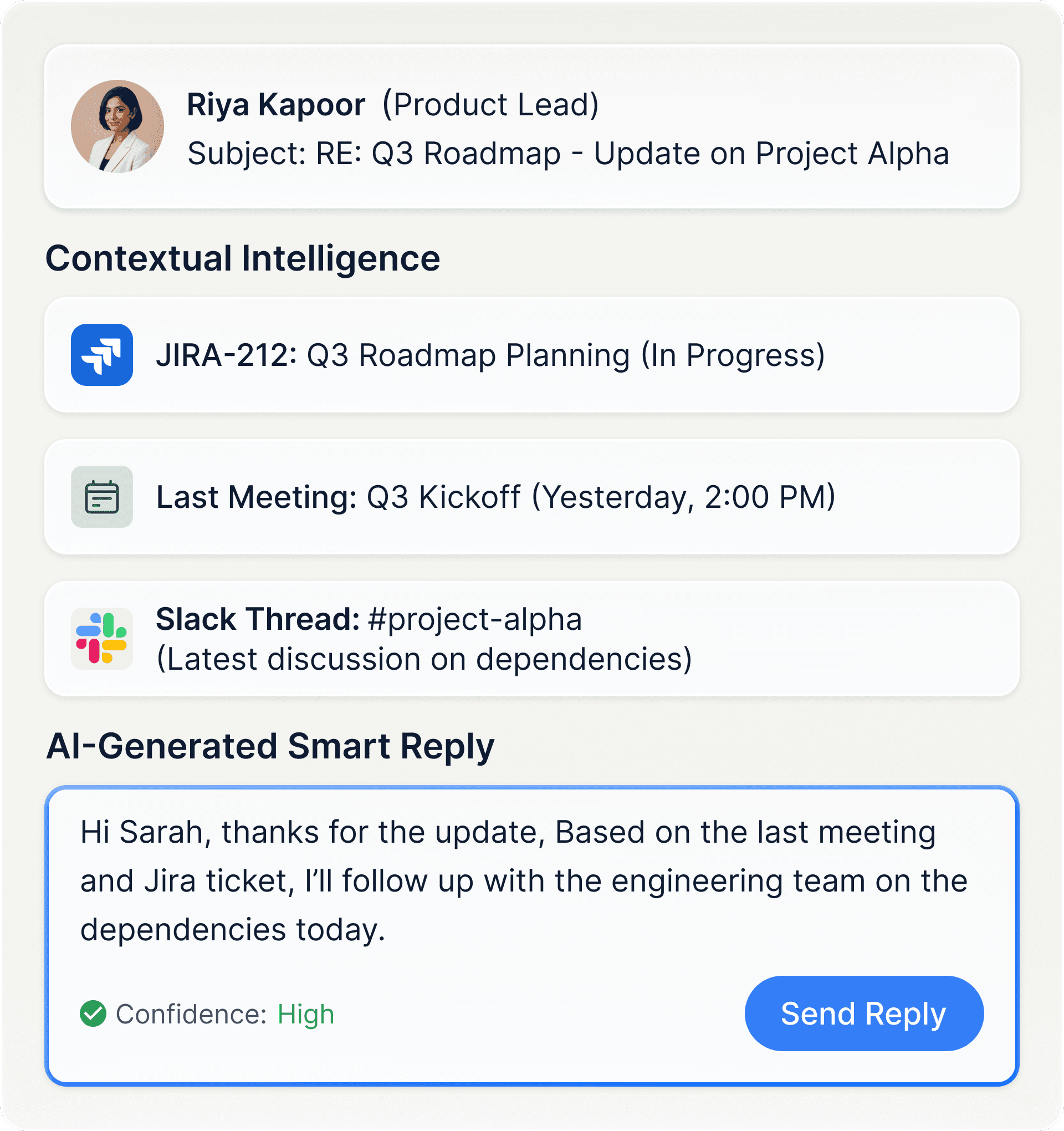
Impact: Email response time dropped 40%. Users achieved “inbox zero” 3x more frequently.

Impact: Email response time dropped 40%. Users achieved “inbox zero” 3x more frequently.

Career Timeline & Review Decks

Aira continuously logs achievements—completed tickets, meetings led, recognition received, problems solved. When performance review season arrives, one click generates a complete deck with quantified impact, peer quotes, and growth areas.

Impact: Review prep time dropped from 6+ hours to under 30 minutes. Promotion rates increased 23% (better documentation = stronger cases).

Impact: Review prep time dropped from 6+ hours to under 30 minutes. Promotion rates increased 23% (better documentation = stronger cases).

Mobile Experience
Mobile Experience

Voice-First AI Companion

Voice-First AI Companion

Designed for on-the-go professionals who need hands-free intelligence

The Mobile Challenge

The Mobile Challenge

Desktop users have keyboards, large screens, and time. Mobile users have thumbs, small screens, and seconds. I needed to completely rethink the interaction model.

Desktop users have keyboards, large screens, and time. Mobile users have thumbs, small screens, and seconds. I needed to completely rethink the interaction model.

Solution 1

Instant Day Orientation

Instant Day Orientation

Instant Day Orientation

Instant Day Orientation

The Problem

Users need clarity in the first 30 seconds of their day—often while commuting or away from their desk.

The Solution

A voice-first daily brief, auto-generated on open and ranked by urgency and meeting impact.

Hands-free orientation while commuting

Priorities ranked by urgency & impact

Impact: Morning orientation reduced from ~45 minutes → under 2 minutes

Solution 2

Resolve Work on the Go

Resolve Work on the Go

Resolve Work on the Go

Resolve Work on the Go

The Problem

Small but critical decisions stall until users return to their desk—blocking dependent work.

The Solution

A mobile-first way to resolve decisions and follow-ups instantly, with full context attached.

Surfaces pending approvals & acknowledgements
One-tap actions without context switching
Linked to meeting, ticket, or email

Impact: Enabled faster resolution of dependent work by removing approval delays from desktop-bound workflows.

Reflections
Reflections

What I Learned

What I Learned

1

AI Trust is Earned Through Incremental Exposure

Early prototypes with full automation terrified users. The breakthrough came when I designed the “confidence escalation ladder”—start with suggestions, graduate to drafts, finally enable auto-execution. Users who experienced this progression developed trust 3x faster than those dropped into full automation.

Application for future projects: When designing AI products, build trust architectures that start conservative and become more autonomous as the user gains confidence.

2

Cross-Platform Consistency ≠ Identical Design

My initial instinct was making all platforms visually identical. User testing revealed this felt unnatural—mobile users want voice and gestures, IDE users want keyboard-first interactions, Slack users expect conversational interfaces.

I pivoted to “consistent intelligence, native interactions”—same brain, different bodies. Each platform feels native to its context while maintaining the same underlying intelligence.

3

Empty States Are Onboarding Opportunities

When users first connected Jira but had no synced tasks, our initial empty state said “No tasks found”—which created anxiety. I redesigned it to show “Setting up your workspace…” with a progress indicator and contextual tips.

This transformed anxiety-inducing empty states into reassuring moments that built confidence. First-time users’ completion rates improved by 34%.

4

Context is the Killer Feature

In early user testing, participants loved individual features (meeting summaries, smart email replies) but the “wow moment” came when they saw everything connected. Opening an email and seeing the related Jira ticket, last meeting discussion, and Slack threads automatically—that’s when they understood Aira’s value.

Insight: The real innovation wasn’t any single feature—it was the context graph connecting everything. Future AI products should prioritize relationship mapping over isolated capabilities.

5

Design for the 80%, Configure for the 20%

I initially tried to design for every workflow variation, which led to overwhelming complexity. The breakthrough came from identifying the 80% use case (knowledge workers in mid-size tech companies) and designing the core experience around them, while making the system configurable for edge cases.

This resulted in a simpler initial experience with powerful customization for advanced users—serving both populations without compromising either.

Let's Work Together

Interested in

working together?

Available for product design roles in AI, SaaS, and workflow-heavy platforms. I bring deep experience in enterprise UX, AI-assisted systems, and complex product ownership.

Available for product design roles · AI · SaaS · Workflow Platforms

CONTACT

Let's Work Together

Interested in

working together?

Available for product design roles in AI, SaaS, and workflow-heavy platforms. I bring deep experience in enterprise UX, AI-assisted systems, and complex product ownership.

Available for product design roles · AI · SaaS · Workflow Platforms

CONTACT

Let's Work Together

Interested in

working together?

Available for product design roles in AI, SaaS, and workflow-heavy platforms. I bring deep experience in enterprise UX, AI-assisted systems, and complex product ownership.

Available for product design roles · AI · SaaS · Workflow Platforms

CONTACT

Create a free website with Framer, the website builder loved by startups, designers and agencies.